
Tui Digital Article
Google Analytics 4 Conversion Tracking: Are You Measuring the Right Actions?
Learn how GA4 events, key events and Google Ads conversions fit together, and check that you measure completed enquiries and purchases rather than clicks alone.
Getting visitors to your website is useful. Knowing whether they enquire, book or buy gives you a clearer view of what your marketing produces. A campaign can bring 1,000 visitors and still need attention if very few become customers.
Google Analytics 4 helps you measure those interactions through events and key events. This guide covers defining and testing those actions, then using them with Google Ads. Separate guides cover reporting differences and website drop-off analysis.
Start with the right GA4 property
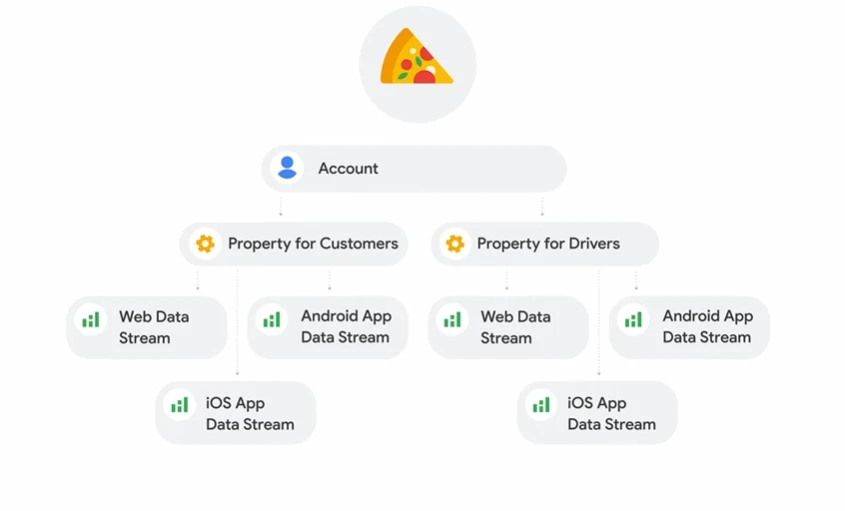
The diagram illustrates one account with separate customer and driver properties, each containing web and app data streams. Treat it as an example of structure: choose properties and streams around your own measurement needs. A simple business website can start with its website property and web stream.
Check that you are viewing the property and web stream installed on your website. Testing in one property while reading reports in another can make working tracking appear to be missing.
Understand events, key events and conversions
GA4 records interactions as events. A page view, a button click and a completed purchase are different events with different business value. You can mark important actions as key events to assess how visitors interact with your website.
For advertising, you can create conversions based on Analytics events and share them with Google Ads. This is a separate setup step from simply recording a page view or marking an event as important. Google’s key events and conversions guide explains how they fit together.
Track a completed action before marking it as important
For a service business, a useful starting point is a successfully submitted enquiry. The event should happen after the form is accepted, rather than whenever someone presses Submit. An invalid form, a server error or a duplicate click should not look like another successful lead.
Test a successful enquiry and an unsuccessful attempt. Check Realtime or DebugView for the expected event, with debugging enabled where needed, and make sure it is not firing twice. Avoid sending names, email addresses, phone numbers or enquiry text into Analytics event parameters.
A telephone-link click can show intent, but it does not prove that someone completed a call or became a lead. Label that action honestly and assess whether additional call measurement is needed for your business.
Mark the relevant event as a key event
In the selected property, go to Admin, then Data display and Events. Find the event and use the star control to mark it as a key event. You will need suitable property permissions; Google’s current key event instructions explain the available options.
Marking the event does not install the tag or create missing event collection. It also does not turn earlier event history into key event history. Allow processing time before checking standard reports, then review the key event’s counting method and value settings.
Connect the action to Google Ads
Link the correct GA4 property and Google Ads account. In Google Ads, open Goals and the Conversions summary, then create a conversion action from the relevant Analytics event or key event. Available options can vary as features roll out, so follow Google’s conversion creation guidance for your account.
Review the imported action’s status, counting method and campaign goals. To use it as a normal bidding goal, it should be configured as primary and included in the goals the campaign uses. Creating an action alone does not establish that a campaign is optimising towards it.
If another conversion action already measures the same enquiry, decide which should be the bidding source before enabling both. One customer action should not accidentally become two primary conversion signals.
Choose actions that reflect business value
For service businesses, completed enquiries, confirmed bookings and qualified phone leads can be useful outcomes. For an online store, completed purchases, transaction identifiers and accurate purchase values help you assess sales and detect duplicates.
Keep page views, scrolling and button clicks available for understanding behaviour. Review which actions are marked as key events or included in advertising goals, so the campaign is not treating an easy page visit as equivalent to a worthwhile enquiry.
Finally, compare recorded leads with what your team receives and what turns into business. A correctly measured form submission can still be spam or an unsuitable enquiry. Tracking needs to support your sales process as well as your reports.
Use the data to make a better next decision
Once the important actions are measured, investigate where visitors drop off. If platform totals differ, our guide to Google Ads and GA4 conversion differences explains what to compare before changing the setup.
Tui Digital helps connect Google Ads, website improvements and measurement around real enquiries. Talk to us about your tracking if you want a clearer view of what your marketing produces.